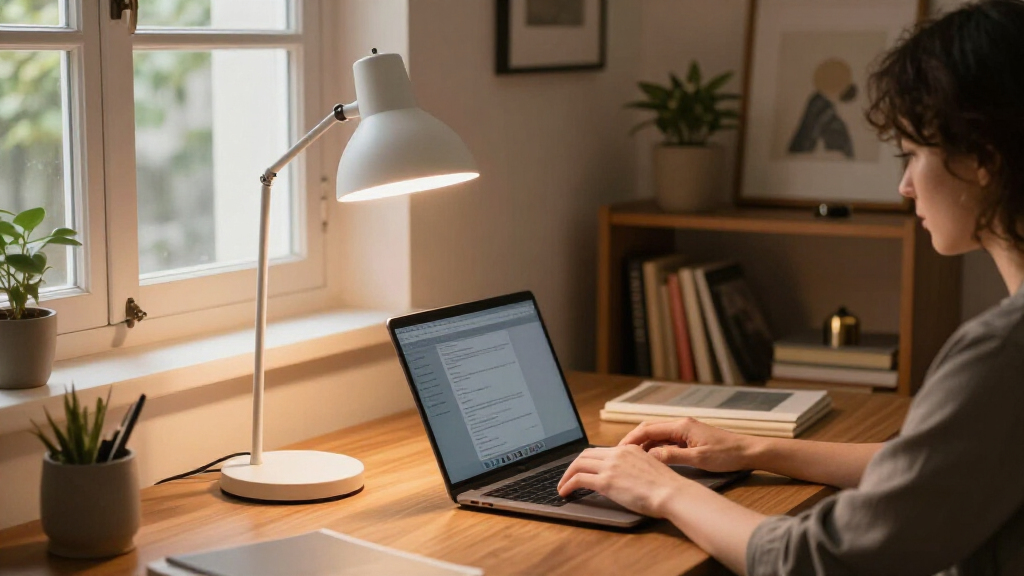

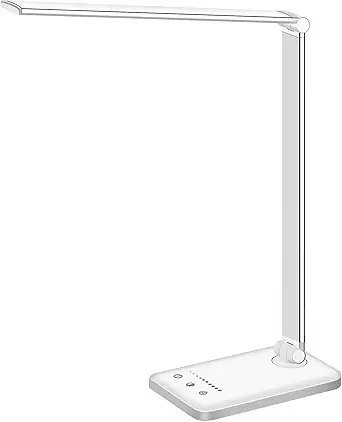
Finding the right desk lamp for study comes down to a few core tradeoffs: light quality versus price, adjustability versus desk footprint, and whether extra features like USB charging actually help or just add clutter. The Honeywell HWT-H2 earns my top spot for its full-spectrum, eye-caring light that holds up through long evening study sessions. If budget leads your decision, the Lepro LED Desk Lamp delivers solid brightness and touch controls at a fraction of the cost, while the Pzloz Architect Lamp is the pick for multi-monitor setups thanks to its clamp mount and 24W dual-screen coverage. Below, I break down all 14 lamps, who each one suits, and which ones you should skip.

Get furniture and decor delivered free with Prime
- Fast, free delivery on millions of items
- Prime Video, Amazon Music and more included
- Member-only deals all year
Complete the kit


Key Takeaways
- The Honeywell HWT-H2 ranked first because its full-spectrum light quality outclasses similarly priced rivals, though it sacrifices USB charging convenience found on cheaper models like the Lepro.
- Clamp-mounted lamps like the Pzloz 24W architect model free up desk space entirely, but demand a desk edge of suitable thickness, so they only suit certain setups.
- Sub-$30 lamps in this lineup (Lepro, BOHON, Shinelife) share nearly identical touch controls and 3-5 color modes, so the real differentiators become build quality and warranty support.
- Tall models like the SIBRILLE 16-inch and LitONES Tall lamp spread light across a full desk rather than one book, making them better for reading plus paperwork, but they need clearance behind your monitor.
- Fixed color temperature lamps like the O’Bright Astrum trade flexibility for a warm, classic feel — great for relaxed reading, limiting for detailed color-sensitive study work.





More Details on Our Top Picks
Lepro LED Desk Lamp for Home Office, 9.5W 750LM Touch Desk Light, Black
For students who need dependable, eye-friendly light without spending much, this Lepro model covers the basics well. Its five lighting modes and five brightness levels give more tuning range than the similarly priced BOHON lamp, which only offers three color modes. The diffused, non-flickering light matters most here: long study sessions feel noticeably less fatiguing than with a bare bulb or cheaper lamp. Compared with the Honeywell HWT-H2, though, it lacks stepless dimming — you’re stuck jumping between presets rather than finding an exact brightness. There are no USB charging ports either, a convenience the LitONES and Honeywell models both include.
Pros:- Five lighting modes plus five brightness levels at a low price
- Diffused, non-flickering light reduces eye strain during long study sessions
- Sleek, space-saving footprint fits cramped desks and bedside tables
- Energy-efficient with no heat buildup
Cons:- 750 lumens falls short for lighting a large desk or room
- No USB charging ports or smart features
Best for: Students and home-office workers on a tight budget who want adjustable, eye-comfortable light for a small desk
Not ideal for: Anyone who charges devices from their lamp or wants precise, stepless brightness control
- Wattage:9.5W
- Brightness:750 lumens
- Lighting Modes:5
- Brightness Levels:5
- Control Method:Touch
- Color:Black
Our verdict“A solid no-frills choice for budget-conscious students who prioritize eye comfort over extras.”
Honeywell HWT-H01 LED Desk Lamp, Foldable & Stepless Dimmable, Black
Where the Lepro lamp locks you into preset brightness steps, this Honeywell goes fully stepless from dim to bright, which makes it the better pick for readers who want to fine-tune light to the time of day and task. Its full-spectrum light with high color accuracy renders page text and printed materials more naturally than standard LEDs — a real advantage for textbook study. The two USB charging ports match the Honeywell HWT-H2’s convenience, though the H2 edges ahead with its USB-C port and 30-minute auto-off timer. The foldable arm helps with storage, but the corded design means it stays anchored to one spot.
Pros:- Stepless dimming allows exact brightness adjustment, not just presets
- Full-spectrum, flicker-free light with high color accuracy
- Two USB charging ports built into the base
- Foldable design collapses for storage or travel
Cons:- 10-watt output may not satisfy those wanting very bright task lighting
- Corded power only — no battery or portability
Best for: Readers and students who want exact brightness control and accurate color rendering for textbooks and printed materials
Not ideal for: People who want a timer function or USB-C charging — the HWT-H2 covers both for a bit more money
- Wattage:10W
- Light Source:Full-spectrum LED
- Dimming:Stepless
- Color Modes:3
- USB Ports:2 x USB-A charging
- Control Method:Touch / push button
- Design:Foldable, freestanding
Our verdict“The pick for readers who care about matching brightness precisely to their task and time of day.”
Honeywell HWT-H2 LED Desk Lamp, Eye-Caring Full Spectrum, USB Charging
This is the lamp I’d point most students toward first, because it gets the details right where it counts. A CRI of 94 means colors and text look true-to-life, and the 2700K–5700K range across four modes covers warm evening reading through cool, focused daytime study — broader than the LitONES lamp’s fixed options in practice. The 30-minute auto-off timer is a genuinely useful study feature the HWT-H01 lacks: it doubles as a focus timer and prevents wasted power if you doze off mid-chapter. Downsides exist. It needs a nearby outlet, and its 11-inch head limits coverage — anyone working across dual monitors should look at the Pzloz clamp lamp instead.
Pros:- CRI 94 full-spectrum light reduces visual fatigue during long sessions
- Four color modes spanning 2700K to 5700K plus 10%–100% stepless dimming
- Both USB-A and USB-C charging ports included
- 30-minute auto-off timer doubles as a focus aid
Cons:- Requires a stable power outlet at the desk
- Light coverage limited to the 11-inch head’s spread
Best for: Students who study at one desk daily and want the best balance of light quality, color range, and charging convenience
Not ideal for: Multi-monitor workstation users who need wide light coverage across a large desk
- CRI:94
- Color Modes:4 (2700K–5700K)
- Dimming Range:10%–100%
- Lamp Head:11-inch rectangular
- Charging Ports:USB-A and USB-C
- Auto-off Timer:30 minutes
- Power Source:Plug-in
Our verdict“The most complete package for dedicated students — excellent light quality, flexible tuning, and thoughtful extras.”
LitONES LED Desk Lamp for Home Office, Eye-Caring Diffused Desk Light
Unique in this lineup, the LitONES doubles as webcam lighting, throwing soft, even illumination that flatters your face on Zoom calls — something none of the other picks attempt. At 15 watts with 76 LED beads, it’s also the brightest of these five, out-shining the Lepro’s 750 lumens for anyone with a deeper desk. The swing arm adjusts across multiple pivot joints, so you can position light exactly over a textbook or tilt it toward your camera. That flexibility cuts both ways: the multi-joint setup takes more fiddling to get right than the simpler Honeywell HWT-H2, and adjusting between study mode and video mode gets tedious if you switch constantly.
Pros:- Doubles as flattering webcam lighting for video calls and online classes
- 15W output with 76 LED beads is the brightest in this batch
- Swing arm offers highly customizable positioning
- Rated for a 100,000-hour LED lifespan
Cons:- Multiple pivot joints make setup and repositioning more involved
- Tied to a power outlet, limiting where you can use it
Best for: Remote students and hybrid workers who juggle coursework and frequent video calls at one desk
Not ideal for: Anyone who wants a set-and-forget lamp — repositioning the multi-joint arm between tasks adds friction
- Wattage:15W
- LED Count:76 beads
- Controls:Touch
- Adjustability:Swing arm, adjustable head and color temperature
- Extra Features:Memory function, timer
- LED Lifespan:100,000 hours
- Power Source:Corded electric (12V)
Our verdict“The smart choice if your study desk is also your video-call station and you want one light to do both jobs.”
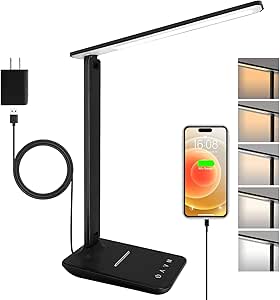
LED Desk Lamp with USB Ports, Touch Control, Dimmable, 5 Modes
Think of this as a small-footprint, do-everything lamp for tight spaces — a dorm nightstand, a shared desk, a corner reading nook. Its 230° flexible arm and 90° base axis fold nearly flat, so it disappears into a drawer or backpack more easily than the sturdier LitONES. The built-in night light mode is a genuine differentiator no other pick here offers, useful for late-night trips to bed without waking a roommate. The tradeoff is flexibility of light itself: only 3 brightness levels against the Honeywell HWT-H2’s stepless 10%–100% range, so precise tuning is off the table. Both USB-A and Type-C ports at 2.1A are a nice surprise at this size.
Pros:- Folds nearly flat for drawer storage or backpack transport
- Night light mode is unique among these picks
- Both USB-A and USB-C charging ports at 5V/2.1A
- 230° flexible arm plus 90° base for versatile aiming
Cons:- Only 3 brightness levels versus stepless dimming on pricier models
- Spare, minimal design may feel flimsy or plain to some buyers
Best for: Dorm residents and students in shared spaces who need a portable lamp with a night-light mode and compact storage
Not ideal for: Detail-oriented users who want fine brightness control — the three preset levels feel coarse compared with stepless options
- Light Colors:5 modes
- Brightness Levels:3
- USB Ports:USB-A and Type-C, 5V/2.1A
- Flexible Arm:230°
- Base Rotation:90°
- Power Adapter:5V/2A
Our verdict“A space-saving, travel-friendly lamp for dorms and shared rooms where portability and a night light beat precision controls.”
Lampat Dimmable LED Desk Lamp, 4 Lighting Modes, Touch Control, 5-Level Dimmer
Long before app-controlled lamps became the norm, Lampat’s four-mode design set the template that newer models like the White Crown and Shinelife copied. The dedicated Reading, Studying, Relaxation, and Bedtime presets mean you don’t have to guess at color temperature — the lamp already tuned each mode for the task, which is genuinely useful for students switching between textbooks and wind-down reading. The touch-sensitive panel feels smoother than the BOHON’s rotary-and-button combo, though the single fixed 1-hour timer is rigid compared with the White Crown’s 30/60-minute options. Compared with the O’Bright Astrum, this lamp offers far more lighting flexibility but gives up the metal build quality — the plastic housing flexes and collects fingerprints on the piano black finish. This pick makes the most sense for students who want preset task modes without paying for features like remote control or auto-dimming they’d rarely use.
Pros:- Four dedicated task presets take the guesswork out of lighting for study sessions
- Touch panel is simpler than button-based rivals like the BOHON
- Built-in USB port keeps a phone charging at the desk
- Five brightness levels cover late-night to daytime study needs
Cons:- Plastic construction feels cheap next to the O’Bright Astrum’s metal frame
- Timer is locked at one hour with no shorter option for quick naps or breaks
Best for: Students who want straightforward preset modes for study versus bedtime reading without a learning curve
Not ideal for: Buyers wanting premium build or flexible scheduling — the plastic body and single fixed timer feel dated next to metal, multi-timer rivals
- Lighting Modes:4 (Reading, Studying, Relaxation, Bedtime)
- Brightness Levels:5
- Control:Touch-sensitive panel
- Timer:1-hour auto-off
- Wattage:10W LED
- USB:Charging port built in
- Material:Plastic, piano black finish
Our verdict“A reliable, no-fuss choice for students who value preset modes and simple touch controls over build quality.”
O’Bright Astrum LED Desk Lamp with Dual USB Charging Ports, 270° Swivel
While most lamps in this roundup chase a futuristic look, the O’Bright Astrum leans vintage — and its full metal construction immediately sets it apart from plastic-bodied options like the Lampat and White Crown. The 270° swivel arms let you throw light across a desk or angle it toward a bed, making it a genuine two-in-one for a dorm room where one lamp serves study and sleep duty. The dual Type-C and USB 2.0 charging ports outclass the single-port setups on the BOHON and Lampat. The tradeoff is light quality: a fixed 3000K warm white at just 4.5W means no color modes, no dimming presets, and limited output for detailed coursework. Compared with the Pzloz architect lamp, which spans 3000K–5500K at 24W, this is a mood-and-ambience lamp first. Skip it if your study sessions demand cool, bright task lighting; choose it if durability and warmth matter more than adjustability.
Pros:- Solid metal build far outlasts the plastic Lampat and White Crown
- Dual Type-C and USB 2.0 ports charge two devices at once
- 270° swivel arms aim light across a desk or bed
- Vintage styling suits decor-focused spaces
Cons:- Fixed 3000K warm light with no color or mode adjustability
- Only 4.5W of output — noticeably dimmer than the 24W Pzloz or 10W BOHON
Best for: Dorm and bedside users who want one sturdy, warm-toned lamp that doubles for light reading and device charging
Not ideal for: Heavy studiers or crafters needing bright, adjustable cool light — the fixed 3000K output is too dim and warm for detail work
Our verdict“A durability-first pick for warm ambient lighting and charging, not for serious task-focused study sessions.”
White Crown LED Desk Lamp with Dimming, USB Charging, and Timer
The White Crown lands in the sweet spot of this lineup: five lighting modes and five brightness levels, a 30/60-minute dual timer, touch controls, and a USB port — more scheduling flexibility than the Lampat’s rigid one-hour-only timer. The aluminum body also gives it a step up in feel over the all-plastic Lampat, though it still isn’t as substantial as the O’Bright Astrum’s full metal frame. What you give up versus pricier rivals is sophistication: no remote like the Pzloz, no auto-dimming like the BOHON, and no battery, so it’s tethered to its 5V/2A adapter. But for a student who mostly needs the right light at the right brightness and a timer that shuts things down after a late study block, those omissions barely register. The 50,000-hour LED lifespan means it will likely outlast the degree it’s bought for. This is the pick when budget and requirements are both moderate.
Pros:- 30/60-minute timer options beat the Lampat’s fixed one-hour limit
- Aluminum construction feels sturdier than plastic rivals at the price
- Five modes and five brightness levels cover most study scenarios
- 50,000-hour LED lifespan is genuinely long-term
Cons:- No battery — fully dependent on the included 5V/2A adapter and outlet placement
- Lacks the auto-dimming and remote convenience of the BOHON and Pzloz
Best for: Budget-conscious students who want mode variety, a flexible timer, and decent build without paying for remote control or smart features
Not ideal for: Anyone wanting cordless placement or advanced features — no battery means it must sit near an outlet, and there’s no auto-dimming or remote
- Lighting Modes:5
- Brightness Levels:5
- Timer:30/60 minutes
- USB Charging Port:Yes
- LED Lifespan:50,000 hours
- Power:5V/2A adapter included
- Material:Aluminum
Our verdict“The most sensible mid-range buy for students who want flexibility and build quality without feature bloat.”
Pzloz LED Desk Lamp for Office and Home – Eye Caring Architect Lamp with Clamp
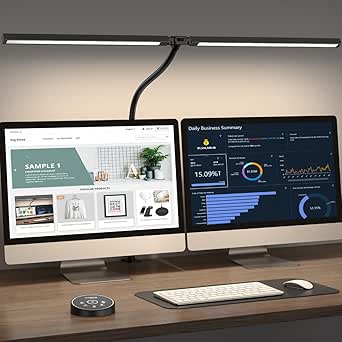
This is the most capable lamp in the batch, and it’s built for a different buyer entirely. At 24W with a 3000K–5500K range, the Pzloz architect lamp dwarfs the output of the 10W Lampat and BOHON — the wide clamp-mounted bar is designed to wash light across a desk with two monitors, not just a textbook. The 360° stand, 180° swing arms, and 270° rotatable head give positioning freedom that no freestanding rival here matches, and the wireless remote means you can adjust brightness from a chair instead of reaching across a crowded desk, unlike the touch-only White Crown. The tradeoffs are real: it’s bulkier, pricier-feeling in setup complexity, and losing the remote would strip away its main control method. If your study station is a laptop and a single book, this is overkill — the White Crown does that job for less. For a full workstation, nothing else in this batch competes.
Pros:- 24W output spans wide desks and dual-monitor setups far beyond 10W rivals
- 3000K–5500K color range suits everything from night reading to daylight study
- Remote control avoids reaching across a busy desk
- Clamp mount frees desk surface that freestanding bases occupy
Cons:- Overkill in size and price for single-book or bedside study needs
- Losing or breaking the remote cripples its main control method
- More involved setup than plug-and-go rivals
Best for: Students and remote workers with dual monitors or large desks who need broad, adjustable, eye-friendly task lighting
Not ideal for: Small-desk or bedside users — the clamp and wide bar eat space, and a compact lamp like the White Crown covers simple needs for less
- Power:24W
- Color Temperature:3000K–5500K
- Brightness Levels:5
- Adjustability:360° stand, 180° swing arms, 270° rotatable head
- Control:Wireless remote
- Mounting:Clamp, tabletop
- Voltage:24V DC
Our verdict“The workstation pick — buy it for a multi-monitor study desk, skip it for anything compact.”
BOHON LED Desk Lamp with USB Charging Port, 3 Color Modes, Dimmable
The BOHON’s standout trick is auto-dimming with ambient light sensing — the lamp reads your room and adjusts brightness to reduce eye strain, something no other lamp in this batch offers, including the higher-spec Pzloz. For long evening study blocks, that hands-off adjustment genuinely matters. The metal body with flexible gooseneck lets you position light precisely, more freely than the fixed-arm White Crown, and the USB port works whether the lamp is on or off — a small but practical edge over rivals that tie charging to the light being active. The compromises: three color modes is fewer than the White Crown’s five, the 900-lumen output won’t flood a large desk the way the 24W Pzloz can, and the rotary-plus-button control takes a few sessions to feel intuitive. It sits between the basic Lampat and the full-featured Pzloz — right for buyers who prioritize comfort features over raw power.
Pros:- Auto-dimming ambient sensor actively reduces eye strain during marathon study sessions
- Flexible gooseneck positions light more precisely than fixed-arm rivals
- USB port charges devices with the lamp on or off
- Metal construction with matte black finish resists the fingerprint issues of glossy rivals
Cons:- 900 lumens is modest for large desks or detailed craft work
- Rotary and push-button controls are less intuitive than the Lampat’s touch panel
Best for: Students prone to eye fatigue during long sessions who want the lamp to handle brightness adjustments automatically
Not ideal for: Large-workspace users — 900 lumens from 10W won’t light a big desk the way the 24W Pzloz can
- LED Array:56 SMD2835 beads
- Color Modes:3 (Natural, White, Warm)
- Wattage:10W
- Brightness:900 lumens, dimmable
- Special Feature:Auto-dimming ambient light sensor
- USB Port:5V/2A, works with lamp on or off
- Material:Metal, matte black
- Base:Freestanding, flexible neck
Our verdict“The eye-comfort specialist — best for long study hours where adaptive brightness beats raw output.”
Honeywell LED Desk Lamp for Home Office Eye-Caring Dimmable Reading Light
Compared with the SIBRILLE 16-inch metal lamp, this Honeywell takes up noticeably less real estate, and that fold-flat arm is the reason it earns a spot here. For a student working on a cramped dorm desk or a shared table, the ability to collapse the lamp between study sessions matters more than raw output. The four color modes spanning 2700K to 5700K daylight cover the full arc of a study day — warm light for evening reading, daylight for focused review — and the stepless touch dimming gives finer control than the fixed six levels on the SIBRILLE. The built-in USB-A and USB-C ports are a genuine convenience the similarly compact Shinelife lamp only partially matches. The tradeoff is that it must stay plugged in, and its light spread suits a single workspace rather than a multi-monitor setup.
Pros:- Foldable, space-saving design ideal for cramped desks
- Four color modes with stepless dimming for precise control
- Dual USB-A and USB-C charging ports built in
- 30,000-hour LED lifespan with 30-minute sleep timer
Cons:- Plug-in only — no battery or rechargeable operation
- Light output is limited to a small personal workspace
Best for: Students and remote workers with small desks who want full color control plus USB charging without sacrificing surface space
Not ideal for: Anyone wanting a cordless or battery-powered lamp, or those lighting a large multi-monitor workstation
- Color Modes:2700K warm, 4000K neutral, 5000K cool white, 5700K daylight
- Dimming:Stepless touch dimming
- USB Ports:USB-A and USB-C, 5V/2A
- LED Lifespan:30,000 hours
- Timer:30 minutes
- Power Source:Plug-in (not rechargeable)
Our verdict“Buy this if desk space is your scarcest resource and you want flexible, eye-friendly light with charging built in.”
SIBRILLE Metal LED Desk Lamp, 16-inch Dimmable Modern Tall Table Lamp
Where most lamps in this roundup lean on plastic, the all-metal construction here sets the SIBRILLE apart — it feels like a piece of furniture rather than an accessory. At 1200 lumens from 15 watts, it outshines the 6-watt Shinelife by a wide margin, making it the stronger pick if your study session involves paper textbooks spread across the desk rather than a single laptop. The 350° rotating head and folding arm allow genuinely precise aiming, and the anti-slip foam base keeps it planted even when the arm is fully extended. The catches: the LED modules are sealed in, so when they eventually fail, the whole lamp goes, and the price sits above simpler touch lamps like the Lampat. For buyers who value durability and output over budget, that premium is defensible.
Pros:- Durable all-metal build with a stable anti-slip base
- 1200LM output far brighter than most compact rivals
- 350° rotating head plus folding arm for precise positioning
- Memory function and timer for set-and-forget convenience
Cons:- Non-replaceable LED modules limit long-term repairability
- Higher price than simpler touch-controlled alternatives
Best for: Readers and heavy paper-based studiers who want maximum brightness and a lamp built to last years of daily use
Not ideal for: Budget buyers or anyone wary of sealed LEDs — a failed module means replacing the entire lamp
- Power:15W
- Brightness:1200LM
- Color Modes:Cool White, Natural, Warm Yellow, Daylight
- Dimming Levels:6
- Arm Rotation:350°, folding arm
- LED Lifespan:50,000 hours
- Dimensions:16″ D x 3″ W x 7″ H
- Base:Metal with anti-slip foam
Our verdict“This is the pick when longevity and sheer brightness matter more than upfront cost.”
Shinelife LED Desk Lamp with USB Charging, Dimmable, Touch Control, 5 Modes
This is the straightforward, low-commitment option in the lineup — and that is its whole appeal. While the LitONES tall lamp offers 50 modes and a telescoping pole, the Shinelife keeps things simple with five color modes, five brightness levels, and touch control, which is plenty for late-night study sessions without a learning curve. The rotating head and foldable base let you angle light over a textbook or laptop, and the USB charging port means one fewer outlet occupied. At 6 watts, it draws little power but also produces less light than the 15-watt SIBRILLE — fine for close work like note-taking, sewing, or puzzles, less so for illuminating a full desk. If you want dependable, eye-comfortable task light at the lowest possible complexity and price, this model makes the most sense.
Pros:- Simple touch controls with no app or setup required
- 5 color modes and 5 brightness levels cover basic study needs
- Rotating head and foldable base for flexible aiming
- USB charging port included at a budget price
Cons:- Low 6W output limits coverage to a small area
- Not suitable for humid environments — no water resistance
Best for: Budget-conscious students and hobbyists who need simple, adjustable task lighting for close work
Not ideal for: Anyone lighting a large desk or dual-monitor setup — 6 watts simply won’t reach that far
- Light Source:LED, single source
- Power:6 watts, 5 volts, corded
- Control:Touch
- Modes:5 color modes, 5 brightness levels
- USB:USB charging port
- Design:Rotating head, foldable base, tabletop mount
Our verdict“Choose this when you want functional, no-fuss study light without paying for features you won’t use.”
LitONES Tall LED Desk Lamp with 50 Light Modes, Eye-Care, Adjustable Height
Sitting at the top of this roundup, the LitONES solves a problem none of the others address: scale. Extending from 14 to 40 inches, it can wash light across dual monitors or a standing desk, something the compact Honeywell or the 6-watt Shinelife cannot attempt. The CRI above 97.8 means colors render nearly true — a real advantage for design students, artists, and anyone doing detail work where the SIBRILLE’s good-but-unspecified rendering falls short. Fifty light modes across a 2700K–6500K range sounds excessive, and for some buyers it will be; the tradeoff is a more involved setup than a simple touch lamp. The 36-month warranty signals confidence the price demands. This pick makes the most sense for serious workspaces where lighting is an investment, not an afterthought.
Pros:- Height range of 14 to 40 inches covers standing desks and multi-monitor setups
- CRI >97.8 for near-true color rendering
- 50 modes across 2700K–6500K with 10 brightness levels
- 36-month warranty backs the premium price
Cons:- More expensive than standard desk lamps in this roundup
- Mode complexity can overwhelm users who just want on/off and dim
Best for: Professionals and creators with dual monitors or standing desks who need wide, color-accurate, adjustable lighting
Not ideal for: Casual users or small-desk students who will find 50 modes excessive and the price hard to justify
- Power:15W
- Height Adjustment:14 to 40 inches
- Light Modes:50
- Color Temperature:2700K–6500K
- Brightness Levels:10
- CRI:>97.8
- Timer:45-minute auto-off
- Warranty:36 months
Our verdict“If your study setup is large and your work color-critical, this is the lamp worth stretching for.”

How We Picked
Because every lamp here is marketed toward students and home-office work, I focused on what actually separates them during long study sessions. Light quality came first: brightness range, color temperature options, and how evenly each lamp diffused light without glare or flicker. Adjustability came second — a lamp you can’t angle toward a textbook or swivel away from a monitor loses value fast, no matter its specs. Desk footprint and mounting style also factored in, since study desks are usually crowded with books and laptops.
From there, I weighed build quality, the usefulness (or gimmickry) of extras like USB ports and auto timers, and finally price-to-performance. The ranking reflects that balance: lamps with genuinely better light and ergonomics sit higher, even at a premium, while cheap lamps that nail the basics beat mid-range models that chase feature lists. Every pick also has real drawbacks noted, because no lamp in this price class does everything well.
Factors to Consider When Choosing Modern Desk Lamps For Study
A desk lamp is one of those purchases that seems simple until you’re squinting at a textbook at midnight. These are the factors that separate a lamp you’ll keep for years from one you’ll replace within a semester.Brightness and Color Temperature Range
Most buyers fixate on peak brightness, but the low end of the dimming range matters just as much for study. A lamp that only dims to 50% is still uncomfortable for late-night reading in a dark room, and glare is one of the fastest routes to eye fatigue. Look for stepless dimming or at least five brightness levels rather than two or three fixed settings. On color temperature, 4000-5000K suits focused, analytical work like math or coding, while warmer 3000K settings are kinder for evening reading before bed. A common mistake is buying a single-temperature lamp like the O’Bright Astrum and only later realizing it’s too warm for daytime study. If you study at different times of day, a multi-mode lamp pays for itself in comfort.
Adjustability: Arm, Head, and Height
Light that points wherever your books are beats light with slightly better specs pointing the wrong direction. Check the range of motion — swiveling heads, folding arms, and adjustable height all change how the lamp works in practice. Tall lamps like the SIBRILLE and LitONES Tall light a whole desk surface, which helps if you juggle a laptop, notes, and textbooks at once. Standard folding lamps suit single-task desks better. Clamp-mounted designs such as the Pzloz reclaim your entire desktop, but measure your desk edge first: thick tabletops or drawer-front lips can block a clamp. Also check whether the lamp holds its position firmly — a head that droops overnight is a daily annoyance that reviews rarely mention until it’s too late.
Eye-Care Claims Versus Reality
Nearly every lamp in this category says “eye-caring” on the box, so treat the phrase as marketing until the specs back it up. What actually reduces strain is flicker-free driving, high color accuracy (CRI 90+), and even diffusion across a wide panel rather than exposed LED dots. Full-spectrum lamps like the Honeywell HWT-H2 and HWT-H1 justify their price here, delivering light that renders text and colors more naturally. The practical test is simple: if you can see individual light points through the diffuser, or text looks slightly washed out, your eyes will work harder over a two-hour session. Students doing color-adjacent work — design, art history, architecture — should prioritize CRI over USB ports or app features every time.
Desk Footprint and Mounting Style
Before buying, sketch where the lamp’s base will actually sit. A heavy round base eats six to eight inches of desk, which is a real cost on a 40-inch student desk shared with a monitor and books. Slim folding designs like the Honeywell HWT-H1 collapse flat when not in use, a nice option for shared or small spaces. Clamp and monitor-bar styles solve the problem outright but limit where you can work — a clamped lamp doesn’t move to another table without tools. If you study in more than one spot, a lightweight corded lamp with a small base beats a fancier fixed one. And check the cord length against your outlet layout; short cords are a chronic complaint on budget lamps.
Extras Worth Paying For (and Ones to Skip)
USB charging ports are the most common extra here, and they’re worth having only if your desk outlets are scarce — otherwise they’re a feature you’ll forget exists. An auto-off timer, found on the Lampat and White Crown, is genuinely useful for students who fall asleep reading or want a forced break cue. Memory functions that recall your last brightness setting sound minor but save real irritation, since most budget lamps reset to max on power-up. Skip paying extra for dozens of lighting “modes” — beyond about five combinations, the differences become indistinguishable. The LitONES Tall lamp’s 50 modes are a spec-sheet win more than a daily-use advantage. Put your money into light quality and arm mechanics before feature count.
Budget Strategy: When to Spend More
Under $30, lamps are largely interchangeable in internals — the differences come down to base stability, touch-panel responsiveness, and how well the brand honors warranties. Between $30 and $60 is where meaningful upgrades appear: better diffusion, fuller dimming ranges, and stiffer joints. Above that, you’re mostly paying for full-spectrum light and premium materials, which makes sense only for heavy daily users or people already prone to eye strain. A reasonable rule: multiply your nightly study hours by the semester length. If you’ll rack up 300+ hours, the upgrade to a Honeywell-tier lamp costs pennies per session. If you study occasionally, the Lepro or BOHON will serve you fine, and putting the savings toward a better chair or monitor makes more sense.
Frequently Asked Questions
Is a full-spectrum lamp like the Honeywell HWT-H2 actually better for studying, or just marketing?
Full-spectrum matters, but only for certain users. Its real benefit is high color rendering, which makes text appear sharper and colors truer, reducing the subtle strain your eyes accumulate over long sessions. If you study mostly plain text for an hour a night, a standard diffused LED like the Lepro will feel nearly identical and save you money. The difference becomes noticeable for marathon sessions, detailed diagrams, or any work where color accuracy counts. Treat full-spectrum as a comfort upgrade rather than a performance multiplier, and weigh it against whether you’d rather spend that budget elsewhere.
Should I get a clamp-mounted lamp or a traditional base for a study desk?
Clamp lamps like the Pzloz win on desk real estate, which matters more than most buyers expect once textbooks, a laptop, and notes pile up. The tradeoff is permanence: a clamped lamp needs a suitable desk edge (usually 0.6 to 2.5 inches thick) and doesn’t travel easily to another table. Base-mounted lamps move freely and work on any surface, but they consume desk space and can be knocked over in a crowded setup. If your desk is under 48 inches, or you already have a large monitor, the clamp is usually the smarter call. For shared desks or studying in multiple rooms, stick with a base.
How many color modes do I realistically need for studying?
Three well-spaced modes — warm (3000K), neutral (4000K), and cool (5000K) — cover essentially every study scenario. The jump from three to five modes adds mild convenience; the jump from five to fifty, as on the LitONES Tall, adds almost nothing you’ll use. What matters more is independent stepless brightness control, because the right color at the wrong brightness is still uncomfortable. A common mistake is choosing a lamp for its mode count and ignoring dimming granularity. Prioritize a lamp where brightness adjusts smoothly and separately from temperature, and you’ll be satisfied with even three presets.
Are USB charging ports on a desk lamp reliable enough to replace an adapter?
For overnight phone charging, yes — most lamps in this range output a steady 5W, which is fine for slow top-ups. What they can’t do is fast-charge a modern phone or power a tablet at full speed, since they lack the higher-wattage protocols. They’re best treated as a convenience that clears one outlet from your power strip, not as your primary charger. If your phone supports fast charging and you’re impatient about battery, keep your real adapter and treat the lamp’s port as backup. Also note that on some budget lamps, charging ports remain powered even when the light is off, so check behavior if that matters to you.
What’s the best lamp for a study desk with two monitors?
Standard single-head lamps struggle here because their beam only covers part of a wide workspace. The Pzloz 24W clamp model was designed exactly for this scenario, throwing enough even light across a dual-monitor arrangement and freeing the desk surface entirely. Tall lamps like the SIBRILLE are the second-best option, lighting from above the monitors down onto your desk. Position any lamp so it doesn’t reflect off your screens — side mounting usually beats rear placement for this. If you’re mostly reading a book beside one monitor, save the money and buy a conventional folding lamp instead.
Conclusion
The right choice depends on how you study. For the best overall balance of light quality, comfort, and price, the Honeywell HWT-H2 is the clear winner — its full-spectrum output keeps long sessions comfortable where cheaper lamps cause fatigue. Budget-focused students get the most from the Lepro LED Desk Lamp, which covers the basics well and leaves money for other desk upgrades. At the premium end, the SIBRILLE Metal lamp brings genuine build quality and 1200LM of wide, adjustable light that justifies its higher price for daily heavy users.
Beginners who just want a plug-and-play lamp with sensible presets should start with the Lampat — its timer, four modes, and USB port make it forgiving while you figure out your preferences. For specific needs: dual-monitor students should go straight to the Pzloz architect clamp lamp, and anyone wanting whole-desk coverage with flexibility should look at the LitONES Tall. Whichever direction you take, the pattern from this comparison is clear — spend on light quality and adjustability first, and let extra features come along for the ride rather than driving the decision.