
To create a productive home office, start by decluttering both your digital files and physical space, organizing everything into labeled folders and keeping only essentials nearby. Set up an ergonomic workspace with adjustable furniture, good lighting, and a tidy environment that minimizes distractions. Personalize your space carefully to boost motivation without overloading it. Maintaining these routines helps reduce fatigue and improve focus, making your remote work more effective—exploring these tips further will help you refine your setup even more.
Key Takeaways
- Establish a designated workspace with ergonomic furniture, proper lighting, and minimal distractions to boost focus and comfort.
- Organize digital files into clearly labeled folders, delete unnecessary documents, and manage notifications to reduce digital clutter.
- Keep essential items within arm’s reach and maintain a tidy environment to streamline workflow and minimize search time.
- Personalize your space with inspiring decorations and incorporate stress management techniques for mental well-being.
- Regularly reassess and adjust your setup to ensure it continues to meet your evolving productivity and comfort needs.

Have you ever wondered how to stay productive and organized while working remotely? The key is creating a space that fosters focus and efficiency. One of the first steps is digital decluttering. Over time, your devices accumulate files, emails, and apps that clutter your digital workspace and distract you from important tasks. Take time to organize your files into clearly labeled folders, delete unnecessary documents, and unsubscribe from email lists that no longer serve you. Clearing your digital environment reduces stress and helps you find what you need quickly, boosting your overall productivity. This process also includes managing notifications—turn off non-essential alerts so you’re not constantly interrupted. A clean digital space not only saves time but also creates a mental clarity that translates into better work performance.
Equally important is your ergonomic setup. The way your workspace is arranged can substantially influence your comfort and focus. Invest in an adjustable chair that supports your lower back, and position your monitor at eye level to prevent neck strain. Your keyboard and mouse should be within easy reach, allowing your arms to rest naturally. Good lighting, preferably natural light, reduces eye strain and keeps you alert throughout the day. If natural light isn’t available, incorporate a quality desk lamp. Keep your workspace tidy so you’re not constantly searching for supplies or documents, which breaks your concentration. An ergonomic setup isn’t just about comfort; it’s about creating a space that encourages healthy habits and minimizes physical fatigue. When your body isn’t strained, you can work longer and more effectively. Additionally, integrating stress management techniques into your routine can help you maintain mental clarity and emotional well-being during busy workdays.
In addition to digital decluttering and ergonomic setup, consider personalizing your workspace with minimal decorations that inspire you. Keep essentials within arm’s reach to avoid unnecessary movement, and designate specific zones for different tasks if space allows. Regularly reassess your setup to ensure it continues to meet your needs as you work remotely. Small adjustments can make a big difference in maintaining focus and productivity. Remember, organizing your home office isn’t a one-time task; it’s an ongoing process that evolves with your work habits. By maintaining a clutter-free digital environment and a comfortable, ergonomic physical setup, you’re setting yourself up for success. These foundational steps will help you stay motivated, reduce physical strain, and keep your mind clear—making remote work not just manageable, but enjoyable.

Marsail Ergonomic Office Chair Ergonomic Gaming Chair with Lumbar Support, 2D Headrest, Adjustable Armrests, Contoured Seat Cushion, Computer Desk Chair with Wheels for Home and Office
- Adjustable Lumbar Support: Supports natural spine curve with height adjustment
- Flexible Headrest & Armrests: 2D adjustable headrest and armrests for comfort
- Wide Tilt Range: 90°-130° tilt for work and relaxation
As an affiliate, we earn on qualifying purchases.
As an affiliate, we earn on qualifying purchases.
Frequently Asked Questions
How Do I Reduce Distractions in My Home Office?
To reduce distractions in your home office, focus on noise reduction by adding rugs, curtains, or noise-canceling headphones. Optimize your lighting by using natural light during the day and adjustable lamps for evenings, which helps you stay alert and focused. Keep your workspace tidy to minimize visual clutter, and set boundaries with family or roommates. These steps create a calm environment, so you can concentrate on your work without interruptions.
What Are the Best Ergonomic Practices for Remote Work?
Ever wonder how to stay comfortable and avoid pain during long work hours? You should prioritize ergonomic practices like using ergonomic accessories—adjustable chairs, keyboard trays, and monitor stands—that support good posture. Regularly optimize your posture by sitting with your feet flat on the floor, keeping your back straight, and aligning your monitor at eye level. These steps can help prevent strain and boost your productivity while working remotely.
How Can I Manage My Time Effectively at Home?
You can manage your time effectively at home by using time blocking to schedule focused work sessions and breaks. Prioritize your tasks with techniques like the Eisenhower Matrix or ABC prioritization to stay on track. Set clear boundaries, stick to your schedule, and avoid multitasking. Regularly review your to-do list, adjust your priorities, and make certain you’re dedicating enough time to high-impact activities for maximum productivity.
What Technology Tools Improve Remote Collaboration?
Think on your feet with essential tools like virtual whiteboards and cloud storage. Virtual whiteboards foster real-time collaboration, making brainstorming sessions seamless no matter where you are. Cloud storage keeps your files accessible and safe, enabling smooth sharing and teamwork. These tools help you stay connected, boost productivity, and turn remote work into a well-oiled machine, ensuring everyone’s on the same page and working toward common goals.
How Do I Create a Boundary Between Work and Personal Life?
To create a boundary between work and personal life, you should set boundaries by defining specific work hours and sticking to them. Establish routines, like shutting down your computer at a consistent time and having a designated workspace, to signal the start and end of your workday. Communicate these boundaries to others, and make sure to prioritize personal time, so work doesn’t spill over into your personal space.

Airlonv LED Desk Lamp with Clamp, 17" Stepless Dimming Light, Black
- Stepless Dimming and Color Adjustment: Adjust brightness and color temperature seamlessly
- 360° Adjustable Flexible Gooseneck: Full control over light direction
- Long Lifespan and Heat Dissipation: Up to 60,000 hours with durable materials
As an affiliate, we earn on qualifying purchases.
As an affiliate, we earn on qualifying purchases.
Conclusion
By creating a cozy, well-organized home office, you’re gently setting the stage for more focused and enjoyable workdays. A tidy space helps you stay on track and reduces those pesky distractions, making your remote work feel a little more like a breeze. Remember, a little effort now seeds smoother days ahead. So, embrace the process—your productive, stress-free work-from-home life is just a tidy corner away.
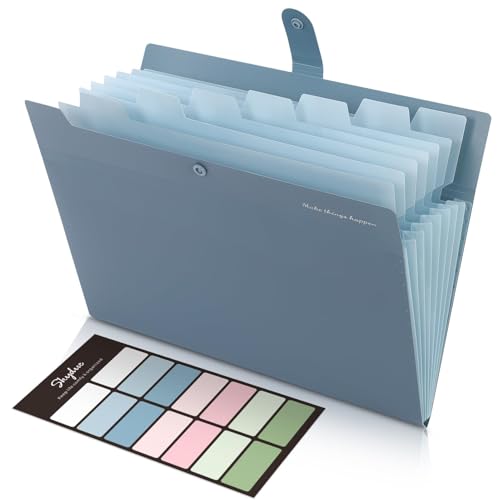
SKYDUE Expanding File Organizer with 8 Pockets, Accordion File Folders with Labels, Portable Document Paper Bill Receipt Organizer, Home College School Office Supplies, Letter Size, Blue
- Size: 13 x 10 x 0.7 inches
- Fits A4 and letter-size paper: Standard document compatibility
- Includes sticker labels: Easy categorization and organization
As an affiliate, we earn on qualifying purchases.
As an affiliate, we earn on qualifying purchases.

BONTEC Dual Monitor Stand Riser, Adjustable Length & Swivel Angle, Ergonomic Wooden Desktop Organizer with Smartphone Holder, Computer Monitor Stand for PC Monitor, Laptop, Printer, Large Storage
- Adjustable Length & Angle: Fits desks from 31.5" to 42.5"
- Ergonomic Eye-Level Height: Reduces neck and shoulder strain
- Large Storage Compartments: Holds keyboard, files, and devices
As an affiliate, we earn on qualifying purchases.
As an affiliate, we earn on qualifying purchases.