
Choosing smart home automation usually means deciding whether to build around a central hub or add Wi-Fi devices directly to your router. A hub-based system can coordinate more devices and routines in one place, but it adds setup, compatibility checks, and sometimes upfront cost. Wi-Fi devices are easier to buy and install one at a time, though a collection of separate brands can mean more apps and less consistent automation. The hub approach fits people building a connected home with linked sensors, lights, and controls; Wi-Fi is a better starting point for a few standalone devices and simple voice or app control.

Get furniture and decor delivered free with Prime
- Fast, free delivery on millions of items
- Prime Video, Amazon Music and more included
- Member-only deals all year

Home Assistant Green Smart Home Hub
- ✔ Operating system: Home Assistant OS
- ✔ Processor: Quad-core
- ✔ Memory: 4 GB LPDDR4X
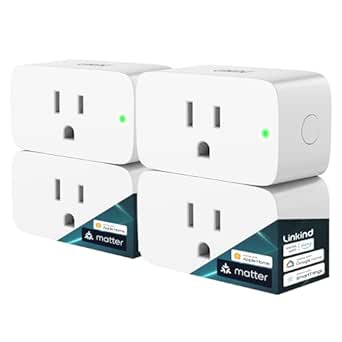
Linkind Matter Smart Plug – Works with Apple Home, Alexa, Siri, Google Home (4 Pack)
- ✔ Pack quantity: 4 plugs
- ✔ Plug type: Type A
- ✔ Power capacity: 1800 W

Kasa HS103P4 Smart Wi-Fi Plug, 4-Pack
- ✔ Model: HS103P4
- ✔ Pack count: 4
- ✔ Operating voltage: 120 V AC
At a Glance
| Criteria | Hub-based smart home system | Wi-Fi smart home devices | Winner |
|---|---|---|---|
| Setup and everyday control | Requires hub setup and compatible-device pairing; can provide one control point. | Usually quick to install through each product’s app; control may be spread across brands. | B |
| Device compatibility | Varies by hub and supported standards; check specific device compatibility before buying. | Broad retail choice, but ecosystems and standards can differ across products. | Depends |
| Automation and local operation | Can coordinate devices and may run some routines locally, depending on hub and products. | Basic schedules and app or voice control are common; cross-brand routines vary. | A |
| Reliability and network load | Adds a controller, but compatible low-power devices may avoid direct Wi-Fi congestion. | Every device uses the Wi-Fi network, which can add load as the system grows. | A |
| Privacy and cloud dependence | Depends on hub, device, and account settings; local control may reduce cloud dependence. | Many products use cloud accounts or services; policies and local features vary by brand. | Depends |
| Upfront and ongoing cost | Higher initial cost; may reduce the need for multiple bridges or subscriptions. | Low starting cost, with potential costs for subscriptions, bridges, or replacing incompatible devices. | B |
| Expansion over time | Well suited to larger systems if the hub supports the devices and standards you want. | Easy to add devices individually, though managing many brands can become cumbersome. | A |
Home Assistant Green Smart Home Hub
Home Assistant Green earns the top spot because it is the only pick here designed to coordinate a broader smart home rather than automate individual outlets. Home Assistant OS comes preinstalled, and the hub stores home data locally, giving us a foundation for managing compatible devices and building more involved routines. Its fanless design is silent, and its low power draw suits a device intended to remain on continuously.Compared with Linkind and Kasa, Green asks more of us at the outset. It needs an Ethernet connection, and the USB ports alone do not provide Z-Wave, Zigbee, or Thread; we need to add the relevant adapter. The plug packs are faster routes to scheduling a lamp or fan, while Green makes more sense when we want one central system to grow around. Buyers seeking a ready-to-use wireless hub may find the cabling and adapter choices inconvenient.We’d choose Green when automation flexibility and local control matter more than a minimal setup. Its 4 GB of RAM and 32 GB of storage provide the basic hardware platform for Home Assistant, but the value comes from the software and the devices we connect, not from included radios. If our goal is only to switch a few appliances on a schedule, Kasa is simpler; if we want a hub that can anchor a wider system, Green is the strongest fit in this lineup.
Pros:
- Home Assistant OS is preinstalled for a more direct start with the platform.
- Local data storage supports a locally managed smart home.
- Fanless, silent design with low power use for continuous operation.
- USB ports allow expansion with separately purchased Z-Wave, Zigbee, or Thread adapters.
Cons:
- Requires Ethernet to get started.
- Z-Wave, Zigbee, and Thread support requires separate USB adapters.
Best for: People who want a central Home Assistant hub with local data storage and the option to expand using compatible USB radios.
Not ideal for: Buyers who want a wireless, ready-to-use setup or only need simple schedules for a few appliances.
Bottom line: Choose Home Assistant Green when we want the broadest automation foundation in this comparison and are comfortable planning its network and radio setup.
“Choose Home Assistant Green when we want the broadest automation foundation in this comparison and are comfortable planning its network and radio setup.”
Linkind Matter Smart Plug – Works with Apple Home, Alexa, Siri, Google Home (4 Pack)
Linkind’s four-pack is the most adaptable way in this group to automate several appliances through a mainstream smart home platform. Matter support lets the plugs work with supported Apple Home, Alexa, Google Home, and SmartThings setups, so we have more room to choose or change platforms than with the Kasa pack. Local LAN control is another practical distinction: plugged-in devices can remain controllable on the local network without an internet connection.That flexibility depends on having a Matter-compatible hub or controller for platform integration. Kasa is easier for a household already using Alexa or Google Assistant that wants to connect plugs directly over Wi-Fi without a separate hub. Linkind is the better fit when cross-platform choice and local control are priorities, but it is not a complete automation hub like Home Assistant Green. It also relies on 2.4 GHz Wi-Fi, so our network needs to support that band.The plugs are rated for up to 1800 W or 15 A and include fire-resistant materials plus overload and short-circuit protection. Those details matter when scheduling appliances that draw more power than a small lamp, although we still need to stay within each connected device’s requirements. We’d pick Linkind for multi-platform plug control across several rooms; we’d skip it if we lack a Matter controller or want automations that coordinate a much wider mix of devices.
Pros:
- Matter support works across several major smart home platforms.
- Local LAN control can keep plug control available without internet access.
- Four plugs support schedules, timers, and voice control.
- Fire-resistant materials and overload and short-circuit protections are specified.
Cons:
- Apple Home, Alexa, and Google Home integration requires a Matter-compatible hub or controller.
- Works on 2.4 GHz Wi-Fi only.
Best for: Households with a Matter-compatible controller that want to automate several outlets and retain flexibility across supported ecosystems.
Not ideal for: Buyers without a Matter controller, or those who want a standalone hub for coordinating many device types.
Bottom line: Choose Linkind when we want several smart plugs with Matter flexibility and local control, and already have the required controller.
“Choose Linkind when we want several smart plugs with Matter flexibility and local control, and already have the required controller.”
Kasa HS103P4 Smart Wi-Fi Plug, 4-Pack
Kasa HS103P4 is the easiest recommendation for buyers who want to start automating lamps, fans, and similar appliances without setting up a dedicated hub. The plugs connect over 2.4 GHz Wi-Fi and can be managed through the Kasa app, with voice support for Alexa and Google Assistant. Timer and countdown functions give us a straightforward way to turn appliances on or off without building a wider automation system.Compared with Linkind, Kasa has a narrower platform footprint: it lists Alexa and Google Assistant compatibility, but not Matter or Apple Home. That narrower scope is also what makes it simple for households already using those assistants. Linkind is more flexible across ecosystems and can offer local LAN control, while Kasa’s supplied details center on app and assistant control. Neither plug pack can replace Green as a hub for coordinating a larger range of devices.The pack of four makes it practical to automate several outlets at once, and the stated 1800 W capacity covers many common household appliances. Setup does depend on a compatible smartphone and the Kasa app, plus a 2.4 GHz network. We’d pick Kasa when simple Wi-Fi schedules are the goal and our home already uses Alexa or Google Assistant. Buyers who need Matter, Apple Home compatibility, or offline local control should consider Linkind instead.
Pros:
- Four plugs provide a simple way to schedule multiple appliances.
- Works with Alexa and Google Assistant voice control.
- Kasa app supports remote control, timers, and countdown scheduling.
- UL certification is listed for safety.
Cons:
- Requires a 2.4 GHz Wi-Fi connection.
- Setup and app control require a compatible smartphone and the Kasa app.
- Its listed assistant support is narrower than Linkind’s Matter ecosystem compatibility.
Best for: Beginners using Alexa or Google Assistant who want app-based schedules for several lamps, fans, or other compatible appliances.
Not ideal for: Households that need Apple Home or Matter support, local LAN control, or a central hub for broader automations.
Bottom line: Choose Kasa HS103P4 for uncomplicated Wi-Fi plug schedules when Alexa or Google Assistant already fits our home.
“Choose Kasa HS103P4 for uncomplicated Wi-Fi plug schedules when Alexa or Google Assistant already fits our home.”
As an Amazon Associate we earn from qualifying purchases.
Key Differences
The clearest divide is between convenience now and coordination later. Wi-Fi devices let you start with a bulb, plug, camera, or thermostat without planning a whole system. That makes them a practical fit for renters, first-time buyers, or anyone who wants a quick result. The tradeoff appears as the device count rises: products may use different apps, cloud accounts, and automation rules, and each device competes for network capacity.
A hub can provide a shared control layer for compatible devices and make linked routines easier to manage. For example, a motion sensor could trigger lights without requiring a separate automation in each brand’s app. This advantage depends on the hub, device standards, and whether routines work locally; a hub does not automatically make every product compatible or private. Its value is strongest when you plan a larger system and verify support before purchasing.
Cost is not simply hub versus no hub. Wi-Fi is usually cheaper at the start, while a hub adds an initial expense that can pay off in consolidated control and expansion. Some Wi-Fi products also require subscriptions or extra bridges, while some hubs have limitations or paid features. Compare the whole setup you intend to use, including services and devices, before deciding.
Detailed Comparison
Setup and everyday control (Wi-Fi smart home devices wins — moderate)
Wi-Fi wins for a small setup; the gap is moderate. Each device typically connects through its own app, so getting a single smart plug or light running is straightforward. A hub adds pairing and compatibility steps, but can make daily control more consistent once several devices are installed. If the system stays small, that extra layer may not earn its keep; with a growing device count, one control point becomes more useful.
Device compatibility (moderate difference)
Neither approach wins in every home; the gap is moderate. Wi-Fi products are widely available, but a shared wireless connection does not guarantee that devices work together in routines. Hub support can link products across categories, yet compatibility depends on the hub’s supported standards and specific models. Check the exact product and feature support before buying, especially if you want sensors and controls from different manufacturers to cooperate.
Automation and local operation (Hub-based smart home system wins — major)
A hub usually wins for coordinated routines; the gap is moderate to major. A compatible hub can connect triggers and actions across several devices, giving you routines that go beyond individual schedules. Some hubs also support local processing, which can keep supported automations working when internet access is down. These benefits are not universal: confirm which automations run locally and whether the devices involved are supported. Wi-Fi products can still automate well, but features may be divided among brand apps or depend on cloud services.
Reliability and network load (Hub-based smart home system wins — moderate)
A hub-based system has an advantage as the device count grows; the gap is moderate. Direct Wi-Fi products all communicate through the router, which can become a concern on a crowded or older network. Many hub systems use other device connections for compatible accessories, reducing the number of devices relying on Wi-Fi directly. They still depend on a working hub and network, and poor placement or incompatible devices can cause problems. For a handful of products, the difference is usually minor.
Privacy and cloud dependence (moderate difference)
This depends on the products, not just the architecture; the gap is moderate. A hub with local processing can keep some control and automation inside the home, but cameras, voice assistants, and other services may still send data to the cloud. Wi-Fi devices vary widely in their account requirements, data practices, and offline behavior. Review the specific product’s privacy settings and internet requirements. A hub is a meaningful advantage only when the devices and routines you care about can actually operate locally.
Upfront and ongoing cost (Wi-Fi smart home devices wins — moderate)
Wi-Fi wins for a low-cost start; the gap is moderate. You can add one inexpensive device without buying a controller, which is attractive when the goal is limited. A hub raises the initial bill, though it may consolidate control or avoid purchasing separate bridges later. Subscriptions can change the calculation for either approach. Compare the cost of your planned set of devices and services rather than assuming that one architecture is always cheaper.
Expansion over time (Hub-based smart home system wins — moderate)
A hub is usually better for a planned, growing system; the gap is moderate. Centralized routines become more useful as you add sensors, switches, and other compatible devices. Wi-Fi remains easy to expand one item at a time, but a mix of apps can make the system harder to maintain. The hub’s advantage depends on long-term support and compatibility, so choose a system that covers the products you expect to add.
Hub-based smart home system: Pros and Cons
Pros:
- Can coordinate compatible devices across categories in shared routines.
- May support local automation and reduce reliance on cloud services for supported functions.
- Offers a clearer control structure as a system grows.
Cons:
- Adds upfront cost and another device to configure and maintain.
- Compatibility varies by hub, standard, and product model.
- A hub does not guarantee that every feature works offline or locally.
Wi-Fi smart home devices: Pros and Cons
Pros:
- Low-cost way to start with one or two devices.
- Often quick to install with a brand’s app.
- Wide selection of products sold individually.
Cons:
- Many devices can mean multiple apps and accounts.
- Cross-brand automation and offline operation vary.
- More direct Wi-Fi connections can burden a crowded network.
Who Should Choose What
Choose Hub-based smart home system if:
- You plan to connect several device types and want them to trigger one another.
- You want a central control point and have confirmed the hub supports your preferred products.
- You value local routines and have verified that the specific devices and automations support them.
Choose Wi-Fi smart home devices if:
- You want a couple of standalone devices with simple app or voice control.
- You want to keep initial spending low and avoid buying a controller.
- You prefer to choose devices individually and do not need complex cross-brand routines.
Skip both if: Skip both approaches if you do not want app accounts, network setup, or connected-device maintenance; conventional switches and timers may be a better fit.
Value for Money
Paying more for a hub is worthwhile when you will use its coordination: linked routines, a shared control point, or verified local operation across several devices. For one or two devices, Wi-Fi usually offers better value because it avoids an upfront controller cost. Estimate the full cost of the setup, including any subscriptions, extra bridges, and devices you may need to replace if they do not work together. A hub is an investment in the system only when its compatibility and features match your plans.
Final Verdict
For most people starting with a few smart home products, choose Wi-Fi devices: they cost less to begin with and are easy to add individually. Choose a hub-based system if you are building a connected home with several device types and want coordinated routines under one control layer. The deciding factor is whether you need devices to work together. If you do, verify compatibility and local features before paying extra; if you do not, a hub is usually unnecessary.
Frequently Asked Questions
Do I need a hub for smart home automation?
No. Wi-Fi devices can provide app control, schedules, and voice-assistant integration without a dedicated hub. A hub is more useful when you want supported devices from multiple categories to work together in shared routines.
Are hub-based smart homes more reliable?
They can be, especially when compatible accessories use connections that do not add directly to Wi-Fi traffic. Reliability still depends on the hub, router, device support, and setup. A hub also introduces a controller that must stay powered and supported.
Can smart home devices work without the internet?
Some can, but offline behavior varies by product and routine. A hub may keep supported local automations running during an internet outage, while many cloud-based features need an active connection. Check each device’s offline capabilities before purchase.
Is a smart home hub worth the extra cost?
It can be worth paying for if you plan to connect several compatible devices and use shared automation. For a single light, plug, or other standalone product, direct Wi-Fi is usually the better value.